Candidates
Live
Resume and portfolio upload
Simplify candidate management with a recruitment CRM that lets you upload, organize, and review resumes, portfolios, and supporting documents from one centralized workspace.
Resume and portfolio upload feature review
The resume and portfolio upload feature helps recruiters and staffing agencies manage candidate documents in a faster and more organized way. Upload resumes, cover letters, portfolios, certifications, visas, LinkedIn profiles, and supporting files directly into candidate profiles for quick access during every stage of the hiring process.
Instead of searching through emails, cloud drives, or disconnected systems, recruiters can keep all candidate information centralized inside one recruitment CRM platform. This makes it easier to review qualifications, compare applicants, and match candidates to open positions more efficiently.
Recruitment agencies and independent recruiters can quickly search and access resumes, preview files directly inside candidate profiles, and manage supporting documents without slowing down their workflow. Having organized candidate records also improves collaboration between recruiters, hiring managers, and clients by keeping every document accessible in one place.
A centralized document management system helps agencies reduce admin work, improve candidate tracking, and speed up recruitment decisions. Whether you are hiring for permanent roles, executive search, or temporary staffing, organized candidate files make placements faster and more accurate.
Resume and portfolio upload key benefits
1
Centralized candidate management
Store resumes, portfolios, and candidate documents in one organized recruitment CRM. Keep candidate information accessible and reduce time spent searching across multiple platforms.
2
Better team collaboration
Give recruiters and hiring teams shared access to candidate profiles and supporting documents. Everyone stays aligned throughout the recruitment process.
3
Faster recruitment decisions
Quickly review resumes, portfolios, and supporting files to identify qualified candidates faster. Improve hiring efficiency with searchable candidate records and centralized data.
Jump on a quick demo call to see how this, and many other features, can save you time and help you grow your agency.

FAQs
How does resume management software help recruiters?
Resume management software centralizes candidate resumes and documents in one system, helping recruiters review applicants faster and improve hiring efficiency.
Can recruiters upload portfolios and supporting documents to candidate profiles?
Yes. Recruiters can upload portfolios, certifications, cover letters, visas, passports, and additional supporting documents directly into candidate profiles.
Why is centralized candidate document management important for recruitment agencies?
Centralized document management reduces admin work, improves recruiter collaboration, and makes it easier to track candidate information across every hiring stage.
Can recruiters preview resumes inside the recruitment CRM?
Yes. Recruiters can preview resumes and uploaded documents directly inside the platform without needing to download files manually.
What types of files can recruiters upload to candidate profiles?
Recruiters can upload resumes, portfolios, LinkedIn resumes, certifications, cover letters, identification documents, and other candidate-related files to support the hiring process.
Resume and portfolio upload: How-to guide
1. Open the Candidate Profile
Navigate to the candidate profile where you want to upload resumes or supporting documents. This is where all candidate files and information are managed.

2. Upload a Resume and Select the Document Type
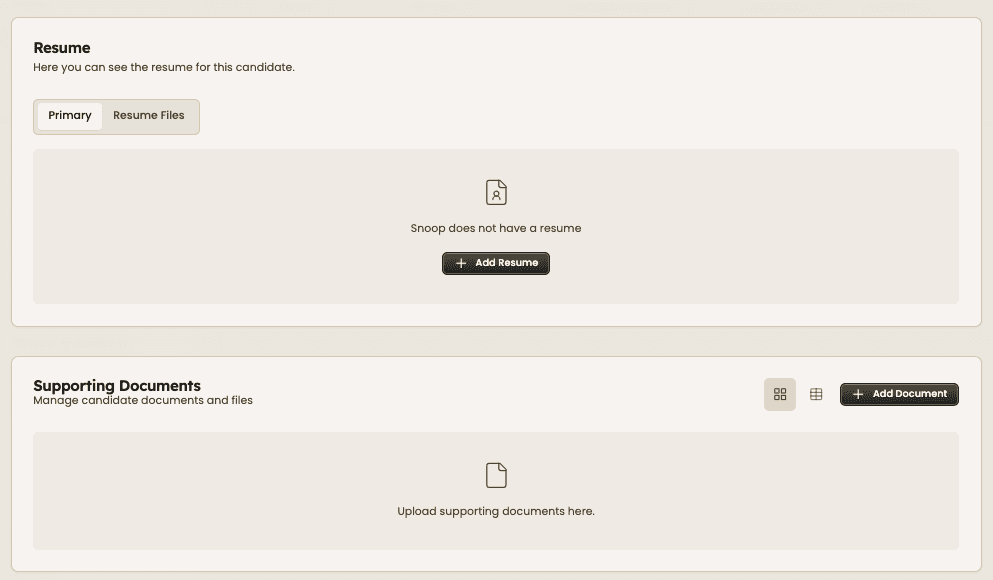
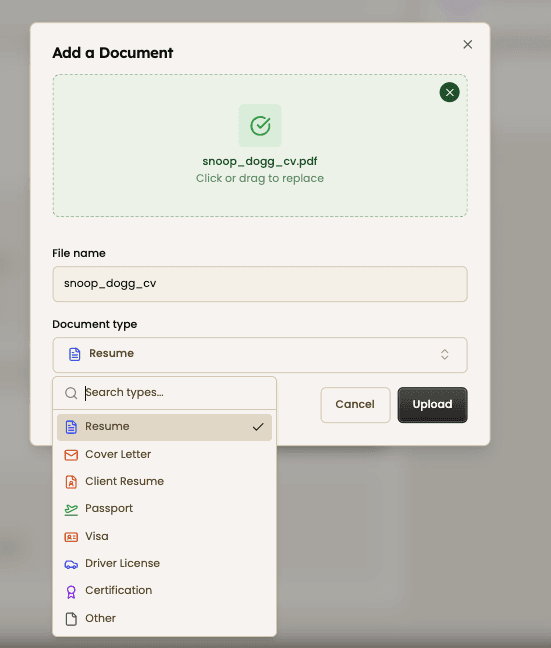
Click “Add Resume” to upload the candidate’s primary resume file. You can upload resumes directly from your computer and store them inside the candidate profile. Choose the correct document category before uploading. Options include resumes, cover letters, client resumes, passports, visas, certifications, driver licenses, and other supporting files.

3. Add Supporting Documents and Portfolios
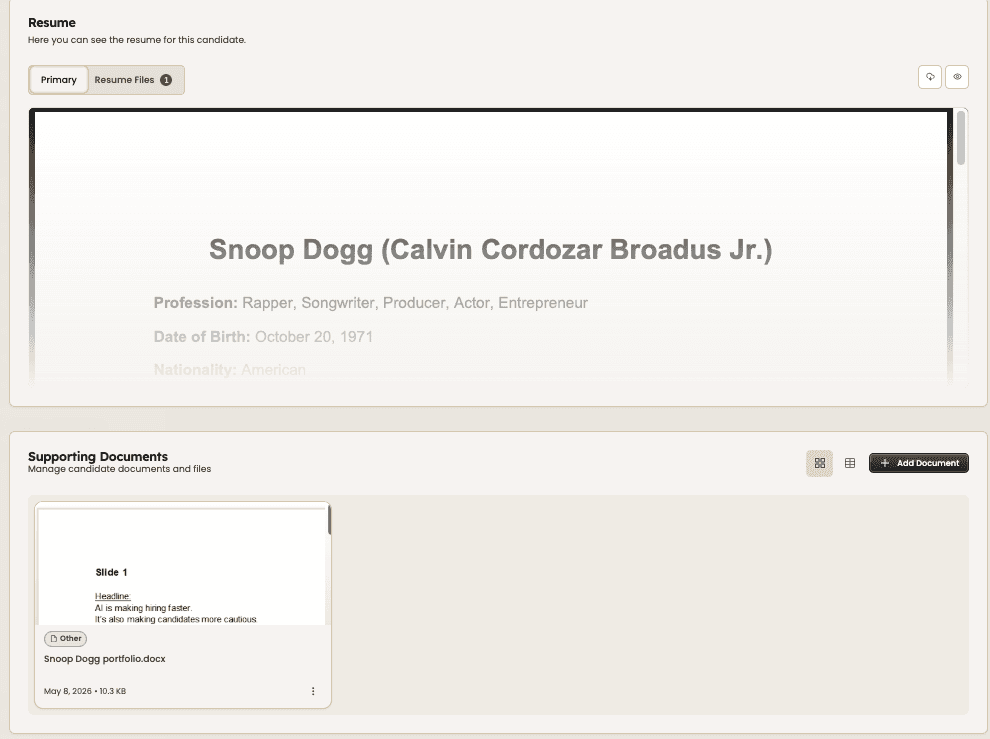
Upload portfolios, presentations, certifications, or additional documents to build a more complete candidate profile. Supporting files stay attached to the candidate record for easy access later.


4. Review and Manage Candidate Files
Preview uploaded resumes and supporting documents directly inside the platform. Recruiters can quickly review files, organize records, and access important candidate information without downloading documents repeatedly.


Feeling stuck or unsure how to begin?
Our friendly support team is here to guide you through every step. Just drop us a line: support@happlicant.com