Team
Live
Tasks and Reminders
Stay on top of every follow-up, deadline, and task across your recruitment pipeline.
Tasks and Reminders feature review
Happlicant’s task and reminder system helps recruiters manage follow-ups, deadlines, and daily workload without relying on memory or external tools.
Create tasks in seconds and link them directly to a job, candidate, or client. Whether you need to follow up after an interview, chase client feedback, or schedule a check-in, everything is tracked in one place.
You can set one-off tasks or recurring reminders for ongoing work like weekly client updates or pipeline reviews. Tasks can also be tied to key actions, so your workflow stays consistent as placements move forward.
All tasks are visible in a centralized dashboard where you can filter by due date, team member, or status. You will see what is overdue, what is coming up, and what is already completed. Notifications are sent in-app so you stay on track throughout the day.
This gives you a clear view of your workload and helps you move candidates and clients forward without delays.
Tasks and Reminders key benefits
1
Automated follow-ups
Set reminders based on timelines or key actions. For example, follow up with a candidate after an interview or check in with a client.
2
Improve client relationships
Keep track of every commitment and deadline. Consistent follow-ups help you build trust and maintain professional communication.
3
Organized recruitment workflow
Manage tasks, reminders, and hiring activities in one place. This reduces admin time and keeps your recruitment process structured.
Jump on a quick demo call to see how this, and many other features, can save you time and help you grow your agency.

FAQs
How do recruiters manage follow-ups in a CRM?
Recruiters use task and reminder features to schedule follow-ups for candidates and clients. This ensures no communication is missed during the hiring process.
Can I set reminders for candidate follow-ups?
Yes. You can create tasks with due dates for candidate follow-ups after interviews, applications, or status updates.
Can tasks be assigned to team members?
Yes. Tasks can be assigned to specific recruiters, making it easy to manage workload across a team.
How do I track overdue tasks in recruitment software?
Overdue tasks are clearly marked in the task dashboard, so you can quickly see what needs immediate attention.
Can I link tasks to jobs or candidates in a CRM?
Yes. Tasks can be connected to jobs, candidates, and clients, keeping all activity organized within your recruitment workflow.
Tasks and Reminders: How-to guide
1. Create a New Task
Click “New Task” from the Tasks page. Enter a clear task title so you know exactly what needs to be done.

2. Set the Due Date
Choose a date and time for the task. This ensures it appears correctly in your task list and helps you prioritize your day.

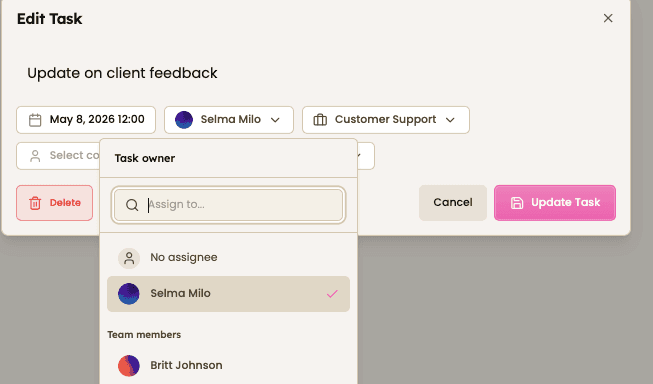
3. Assign the Task
Select the team member responsible for the task. You can also link it to a specific job, contact, or candidate.
4. Link to Candidate or Client
Attach the task to a candidate or client record so all activity stays connected and easy to track.

5. Track and Update Tasks
View tasks in your dashboard. Mark them as complete, edit details, or filter by due date, team member, or status.

Feeling stuck or unsure how to begin?
Our friendly support team is here to guide you through every step. Just drop us a line: support@happlicant.com