Jobs
Live
Job reports
Know exactly how your jobs are performing. Turn your recruitment pipeline into actionable insights.
Job reports feature review
Turn your recruitment pipeline into useful hiring data. Job Reports give you a clear view of candidate flow, conversion, sources, time in stage, and why candidates are being rejected — all in one place.
See how candidates move through each stage with a visual funnel showing candidate counts, conversion rates, time in stage and new candidates over time. Quickly spot bottlenecks, see where candidates are dropping off, and identify which jobs need attention.
See where your candidates are coming from and understand which sources are contributing to your pipeline. Whether it’s LinkedIn, job boards, referrals or campaigns, you can see what’s driving candidate flow for each job.
Get a clearer picture of why candidates are being rejected. Record an optional rejection reason when rejecting a candidate, then see the breakdown in your job report. Spot patterns around experience, salary, location, availability or other reasons specific to your recruitment process.
Rejected candidates stay attached to the stage where they were rejected, appearing in a collapsible layer below your pipeline. This keeps your active pipeline clean while preserving the full picture of what happened to every candidate.
Job Reports bring your job activity together in one place, helping you spend less time piecing together spreadsheets and more time understanding your recruitment process.
1
See your pipeline performance
Understand how candidates move through your pipeline with stage-by-stage counts, conversion rates and time in stage.
2
Understand why candidates are rejected
Track rejection reasons and see where candidates are dropping out. Spot patterns and make better hiring decisions.
3
Know what’s driving your pipeline
See where candidates are coming from and how your candidate volume changes over time, all at a job level.
Jump on a quick demo call to see how this, and many other features, can save you time and help you grow your agency.

FAQs
Do I need to set up anything before using Job Reports?
No. Reports are available automatically on every job. You can start viewing your data straight away.
How do I add rejection reasons?
Go to Settings → Rejection Reasons and add the reasons you want your team to use. You can edit, reorder or remove them at any time.
What happens if I reject a candidate without selecting a reason?
Nothing is lost. Rejection reasons are optional, and candidates rejected without one will appear as “No reason recorded” in your job reports.
Can I add a note along with the rejection reason?
Yes. When rejecting a candidate, you can select a rejection reason and add an optional note with any additional context. You can also choose whether to send the rejection email.
Job reports: How-to guide
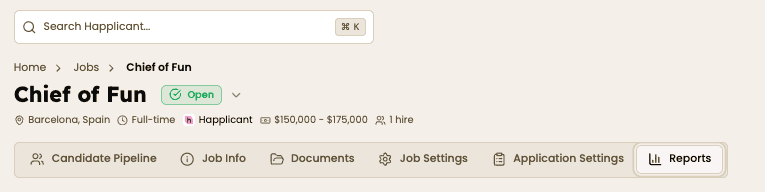
Go to Jobs and open the job you want to analyse. Select the Reports tab at the top of the job to see an overview of its recruitment activity.

Use the Pipeline Funnel to see how many candidates are at each stage, your conversion rates, and how long candidates are spending in each stage.
Scroll down to see new candidates over time and candidate sources. This helps you understand where your pipeline is coming from and how it's changing.


Add rejection reasons under Settings → Rejection Reasons. When rejecting candidates, select a reason and it will automatically feed into the Rejection Reasons report for each job.



Feeling stuck or unsure how to begin?
Our friendly support team is here to guide you through every step. Just drop us a line: support@happlicant.com