Communication
Live
Full email integration
Connect email account and manage your inbox directly inside Happlicant. Every email is automatically linked to the relevant candidate, giving recruiters complete visibility into conversations, outreach activity, and hiring progress without leaving the platform.
Full email integration feature review
Happlicant’s email integration brings your inbox directly into your recruiting CRM, making it easier to manage candidate communication from one centralized platform.
Once connected, incoming and outgoing emails are automatically synced and linked to the correct candidate profile. Recruiters can view complete email threads, track communication history, and send emails directly from Happlicant without switching between multiple tools.
Every conversation becomes part of the candidate record, helping recruiters stay informed throughout the hiring process. Whether you're reviewing interview discussions, checking previous outreach, or preparing for a client call, all communication is available where you need it.
The integrated inbox also improves collaboration across recruitment teams. Team members can access communication history directly from candidate and contact profiles, reducing information gaps and creating a more consistent recruitment experience.
For staffing agencies, independent recruiters, and growing talent acquisition teams, centralized email management removes manual tracking and keeps communication organized at scale. Instead of managing disconnected inboxes, recruiters can handle outreach, follow-ups, and relationship management inside one recruiting platform.
Built directly into Happlicant’s recruiting software and recruiting CRM, email integration helps recruiters save time, improve visibility, and build stronger candidate and client relationships throughout the hiring process.
Full email integration key benefits
1
Centralize recruitment communication
View candidate email conversations directly inside their profiles without switching between inboxes and your recruiting software.
2
Track complete email history
Automatically sync email threads and communication activity so recruiters always have full visibility into candidate and client interactions.
3
Send emails directly from Happlicant
Manage outreach, follow-ups, and recruitment communication directly inside the recruiting platform while keeping all activity connected to the right profiles.
Jump on a quick demo call to see how this, and many other features, can save you time and help you grow your agency.

FAQs
What is email integration in recruiting software?
Email integration connects your inbox directly with your recruiting platform, allowing recruiters to manage candidate and client communication inside the recruitment workflow.
Can recruiters view email conversations inside candiate profiles?
Yes. Happlicant automatically connects email threads to candidate and contact profiles so recruiters can review communication history directly inside the recruiting CRM.
Can recruiter send emails from Happlicant?
Yes. Recruiters can send emails directly from Happlicant while keeping communication history synced with candidate and contact records.
How does email integration improve recruitment workflows?
Centralized email management helps recruiters reduce context switching, improve communication tracking, and keep recruitment activity organized inside one staffing software platform.
Who is the email integration build for?
The feature is designed for recruiters, staffing agencies, talent acquisition teams, and businesses that want a more connected recruiting platform with centralized communication management.
Full email integration: How-to guide
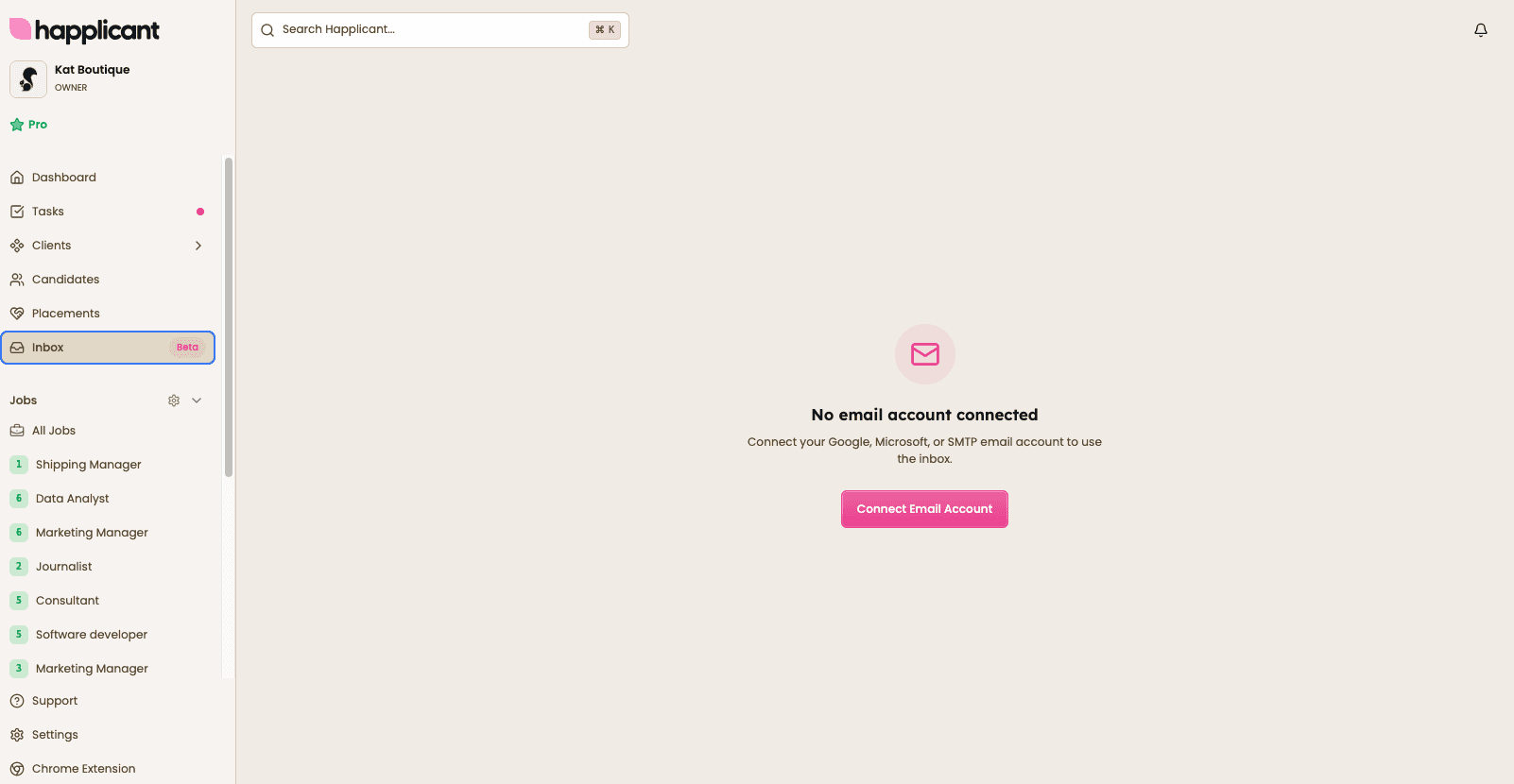
1. Connect your email account
Go to Inbox from the main menu. If your email account is not connected yet, click Connect Email Account to get started.
💡 Already using email integration? If your email account was connected before, simply reconnect and verify it again to activate inbox syncing and email tracking.

2. Choose your email provider
Connect your Gmail, Microsoft 365, Outlook, or SMTP email account. Once connected, Happlicant can send and receive emails while automatically syncing your communication history.
Before you start sending emails, create your email signature. Your signature will automatically be added to all outgoing emails sent from Happlicant.
💡 Using email templates? If your existing email templates already include a signature, we recommend removing it from the template. This ensures your new email signature is applied consistently across all emails.


3. Access your inbox
Your inbox is available directly inside Happlicant. View incoming emails, sent messages, and drafts without switching between platforms.


4. View email history on candidate profiles
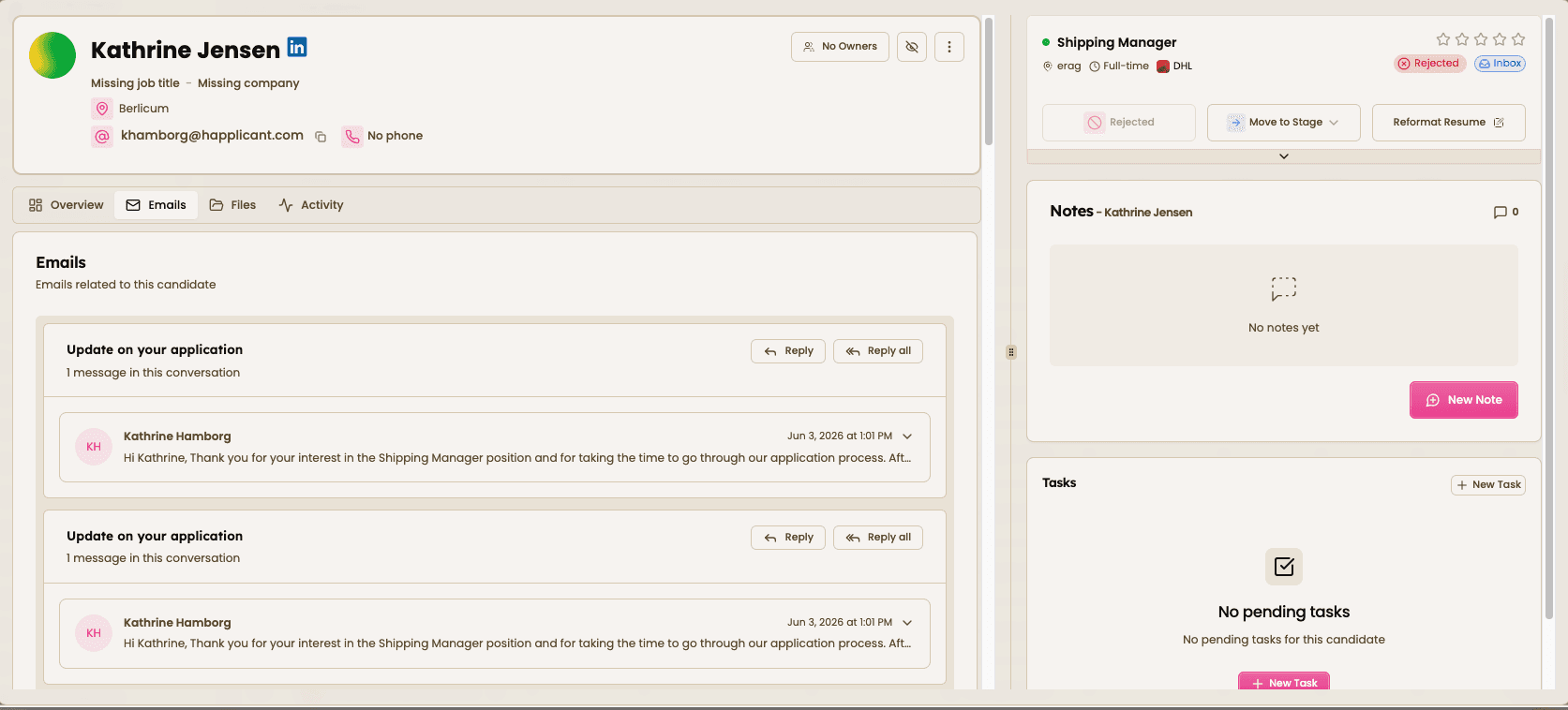
Emails are automatically linked to the relevant candidate profile. Open any candidate to see previous conversations, email threads, replies, and outreach activity in one place.

5. Send and reply from Happlicant
Send new emails, reply to messages, and manage candidate communication directly from Happlicant. Every email is automatically tracked and stored, giving you a complete communication history without leaving the platform.



Feeling stuck or unsure how to begin?
Our friendly support team is here to guide you through every step. Just drop us a line: support@happlicant.com