Candidates
Live
Custom fields
Take full control of your candidate profiles with custom fields that capture the exact data you need for every role, client, and recruitment workflow.
Custom fields feature review
Custom fields for candidate profiles give recruiters the flexibility to structure candidate data around real hiring requirements.
Instead of working with generic profiles, you decide what information gets captured and how it appears. For sales hiring, track metrics like average deal size, quota attainment, or experience with enterprise and SMB segments. For technical hiring, capture programming languages, frameworks, certifications, and project experience in a consistent format.
Choose from flexible field types such as text, number, date, single select, and multi-select to build structured profiles that are easy to review and compare.
This turns every candidate profile into a clear, standardized dataset. Recruiters can filter candidates faster, match profiles to job requirements with more precision, and reduce time spent on manual screening. It also keeps your recruitment CRM organized, searchable, and aligned with how your team actually hires.
Custom fields key benefits
1
Role-Specific Candidate Data
Capture the exact data points that matter for each role. From sales performance metrics to technical skills, every profile becomes more relevant and actionable.
2
Faster Shortlisting and Better Matches
Filter and compare candidates using structured data. Identify qualified candidates faster and reduce time spent reviewing poor fits.
3
Fully Customizable Profiles
Create fields based on your workflow, clients, and hiring needs. Adjust your candidate database as roles and requirements change.
Jump on a quick demo call to see how this, and many other features, can save you time and help you grow your agency.

FAQs
What are custom fields in recruitment software?
Custom fields allow recruiters to capture and store structured data across their workflow, such as candidate details, role-specific criteria, or client requirements. They help standardize information and improve visibility across the hiring process.
How do I add custom fields to candidate profiles?
Go to candidate field settings, activate custom fields, then create a new field by choosing a name and field type. Once saved, it will appear across candidate profiles.
Can custom fields be tailored to different roles or industries?
Yes, custom fields can be adapted to match different hiring needs. Whether you are recruiting for sales, technical, or operational roles, you can capture the most relevant data for each context.
What field types should I use for recruitment data?
Use number fields for metrics like salary or experience, select fields for standardized options, and text fields for flexible input. Structured fields improve filtering and reporting.
Where can custom fields be used in a recruitment platform?
Custom fields can be applied across different parts of the recruitment workflow, including candidate profiles and other areas where structured data improves visibility, reporting, and decision-making.
Custom fields: How-to guide
1. Activate custom fields
Turn on custom fields in settings to start building your candidate data structure. This enables both system and custom fields across your platform.


2. Create your first field
Click “Add your first field” and enter a clear display name such as “Years of Experience” or “Sales Quota Attainment.”


3. Choose the right field type
Select the format that fits your data. Use text for open input, number for measurable data, date for timelines, and select or multi-select for predefined options.


4. Add details and guidance
Include a short description and placeholder text to guide your team on how to fill out the field consistently.

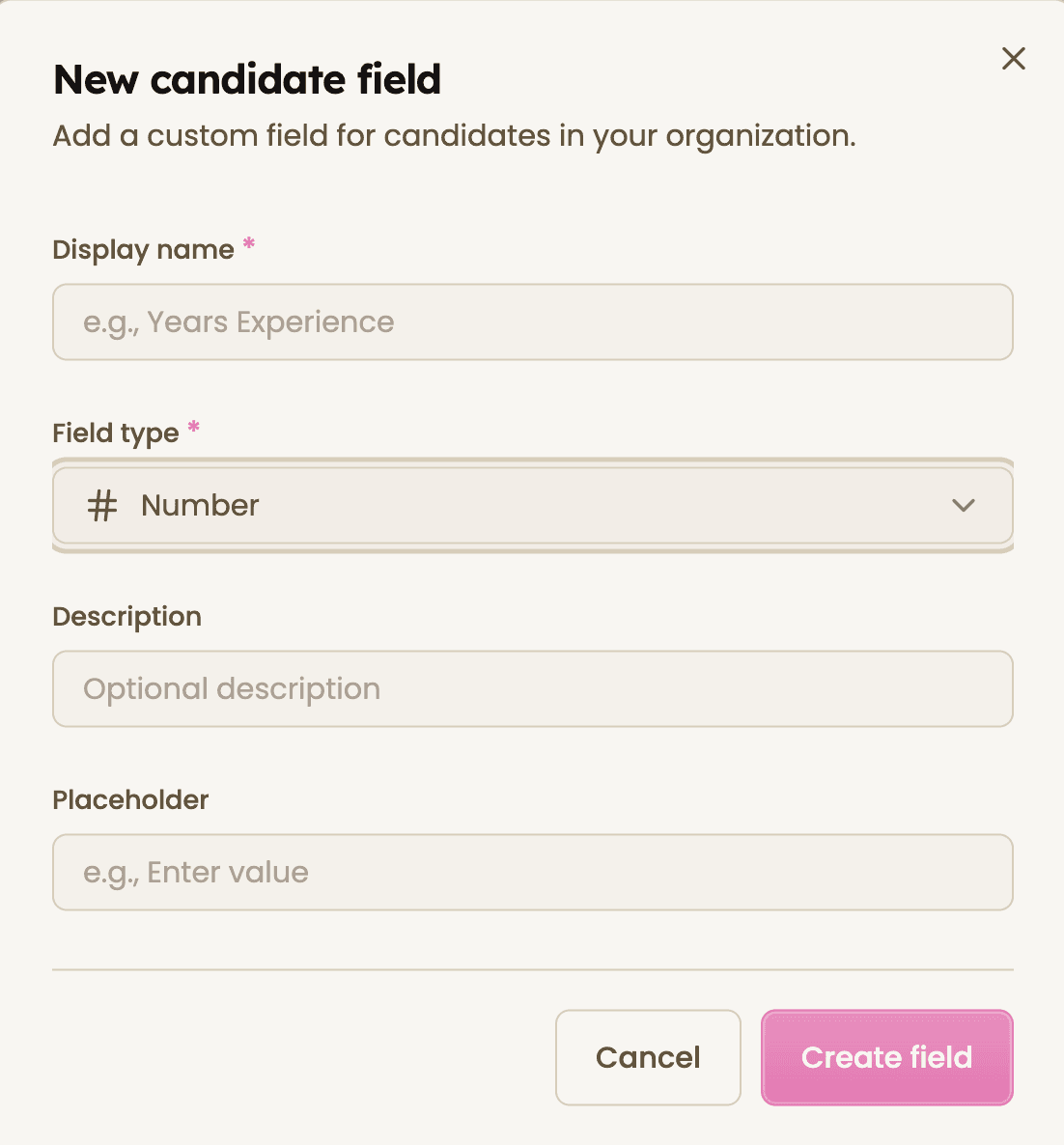
5. Save and start using fields
Create the field and begin using it across candidate profiles. Toggle visibility and reorder fields to match your workflow.


Feeling stuck or unsure how to begin?
Our friendly support team is here to guide you through every step. Just drop us a line: support@happlicant.com