Candidates
Live
Candidate table view
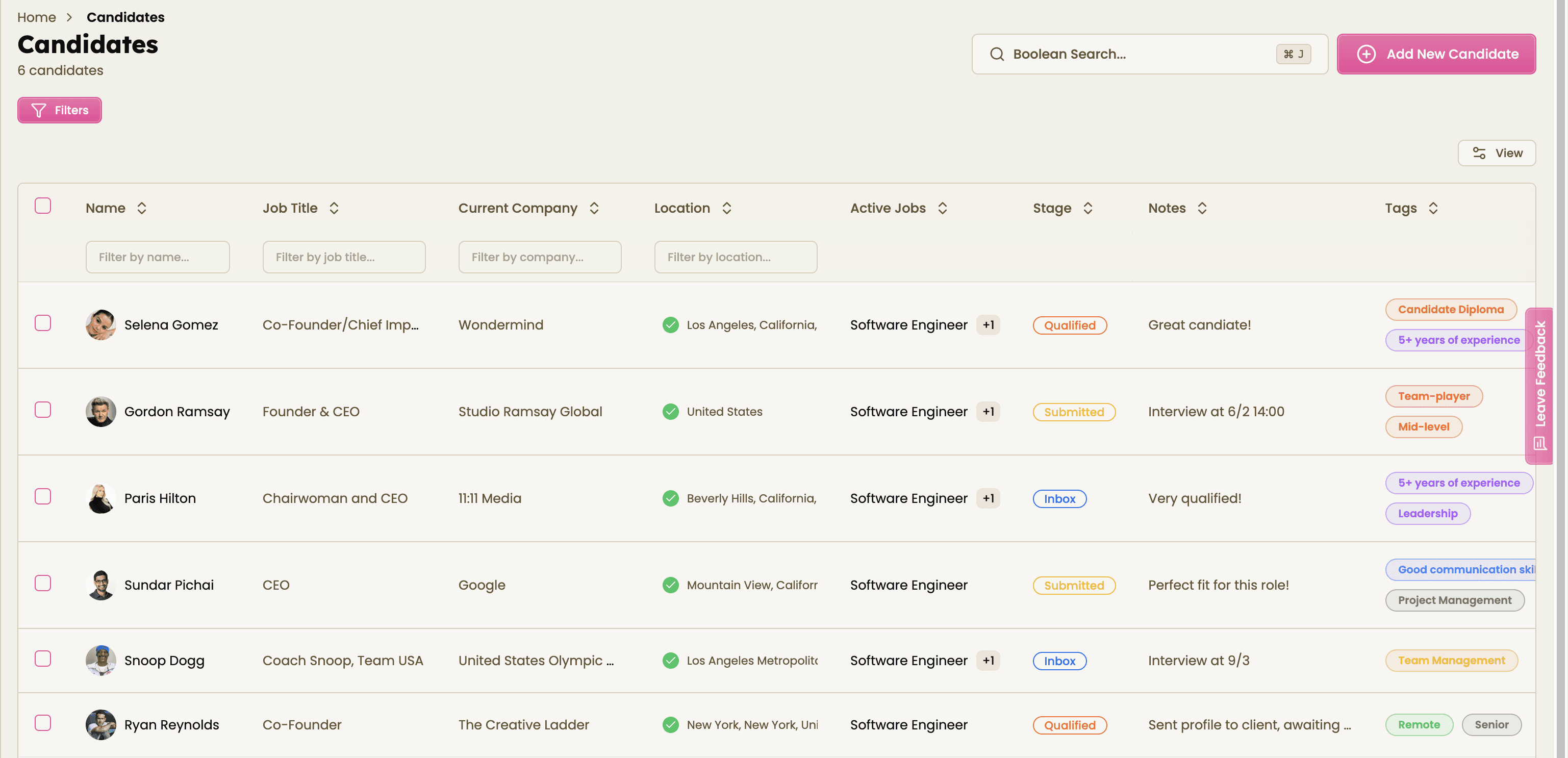
Organize your candidate database with an easy-to-use candidate table view built for small recruitment agencies and solo recruiters. Review applicants, update hiring stages, and move candidates through your pipeline faster with recruitment CRM software that keeps everything structured and searchable.
Candidate table view feature review
The candidate table view gives recruiters a clear, organized overview of every applicant in the hiring pipeline. See candidate status, job title, company, notes, tags, and recruitment stage in a single dashboard so your team can make faster hiring decisions with less admin work.
Instead of jumping between profiles or spreadsheets, recruiters can filter candidates, sort applications, update statuses, and manage hiring workflows directly from one centralized recruitment dashboard. Whether you are reviewing active applicants, shortlisting top talent, or progressing candidates to the next interview stage, every action is quick and easy to manage.
Bulk actions help recruiters save time by updating multiple candidates at once, reducing repetitive tasks and lowering the risk of missed follow-ups. With a structured candidate management system, recruitment agencies can keep pipelines organized while improving recruiter productivity and candidate tracking.
Built for modern recruiting teams, this candidate table view helps agencies spend less time on manual admin and more time placing qualified candidates faster.
Candidate table view key benefits
1
Enhance your workflow
Filter, sort, and manage candidates from one centralized recruitment dashboard. Keep your hiring pipeline organized and move applicants through each stage faste
2
Reduce manual work
Use bulk actions to update candidate stages, assign tags, and manage multiple applicants at once. Minimize admin tasks while improving accuracy across your recruitment process.
3
Boost your productivity
Access candidate details instantly, review hiring progress quickly, and make faster decisions with recruitment CRM software built for agencies and recruiters.
Jump on a quick demo call to see how this, and many other features, can save you time and help you grow your agency.

FAQs
What is a candidate table view in recruitment software?
A candidate table view is a centralized dashboard that displays all applicants in a structured format. Recruiters can review candidate status, hiring stages, notes, tags, and job assignments in one place for faster pipeline management.
How does a candidate table improve recruiter productivity?
A candidate table helps recruiters quickly sort, filter, and update applicants without switching between multiple screens. This speeds up hiring workflows, reduces manual admin work, and improves candidate tracking.
Can recruiters update multiple candidates at once?
Yes. Bulk actions allow recruiters to move candidates through hiring stages, assign tags, and update statuses simultaneously, helping agencies manage large applicant volumes more efficiently.
Is the candidate table view suitable for small recruitment agencies?Absolutely. The candidate table view is designed for solo recruiters and small recruitment agencies that need a simple, organized way to manage applicants, clients, and hiring pipelines without complicated workflows.
How does candidate table software help reduce hiring mistakes?Recruitment CRM software with a structured candidate table helps teams stay organized, track every applicant clearly, and avoid missed updates or follow-ups. This improves communication and creates a more reliable hiring process.
Candidate table view: How-to guide
View all candidates in a centralized recruitment dashboard
Filter applicants by stage, role, location, or tags
Update candidate statuses individually or in bulk
Track hiring progress in real time
Keep your recruitment pipeline organized from first contact to placement




Feeling stuck or unsure how to begin?
Our friendly support team is here to guide you through every step. Just drop us a line: support@happlicant.com