Candidates
Live
Candidate profile
Maximize your recruitment efficiency with detailed candidate profiles that enhance your decision-making.
Candidate profile feature review
A Complete View of Every Candidate
For an independent recruiter or small recruitment agencies, context is everything.
When you work without a large support team, you cannot afford to lose track of conversations, applications, or feedback.
The candidate profile brings every interaction, application, note, and activity into one clear overview. Whether you are an independent recruitment consultant, an independent headhunter, or you're running a small recruitment agency, you get a structured hub that shows the full journey of each candidate.
From first contact to placement, everything is logged and easy to access. You can see:
Application history across roles
Notes and internal comments
Email and activity tracking
Status changes in your kanban pipeline or hiring pipeline
This structure supports a customizable recruitment workflow that fits the way you work. The candidate profile connects directly to your pipeline kanban view so nothing feels disconnected.
Stronger Candidate Relationships
Understanding the full journey of a candidate makes communication sharper and more relevant.
When you can see their previous roles, feedback history, and engagement level in one candidate snapshot, it becomes easier to personalize your outreach.
Clear visibility helps you:
Apply practical ways to keep candidates warm during hiring
Improve follow-up timing
Deliver a smoother experience
Automated updates, structured tracking, and engagement scoring allow you to respond at the right time without losing the human touch.
The result is simple: better placements and more happy applicants.
Candidate profile key benefits
1
Comprehensive insights
Gain in-depth knowledge of every candidate’s journey, empowering strategic decisions in your recruitment agency software.
2
Efficient Communication
Use engagement history and structured notes to personalize outreach and maintain stronger relationships throughout your hiring pipeline.
3
Streamlined Workflow
Manage candidates across customizable recruitment workflows and kanban pipelines without switching tools or relying on spreadsheets, reducing manual tasks and increasing your productivity.
Jump on a quick demo call to see how this, and many other features, can save you time and help you grow your agency.

FAQs
Can I customize my hiring pipeline?
Yes. You can build customizable recruitment workflows and manage candidates inside kanban pipelines that match your recruitment process.
Is this suitable if I am starting up a recruitment business?
If you are starting up a recruitment business or learning how to start a recruitment agency, structured candidate profiles help you build professional processes from day one without relying on spreadsheets.
Does this help improve candidate experience?
Yes. By tracking communication history, application progress, and engagement levels in one place, you can respond faster, communicate more clearly, and deliver a more consistent and professional candidate experience.
Candidate profile: How-to guide
Tracking Applications and Pipeline Movement
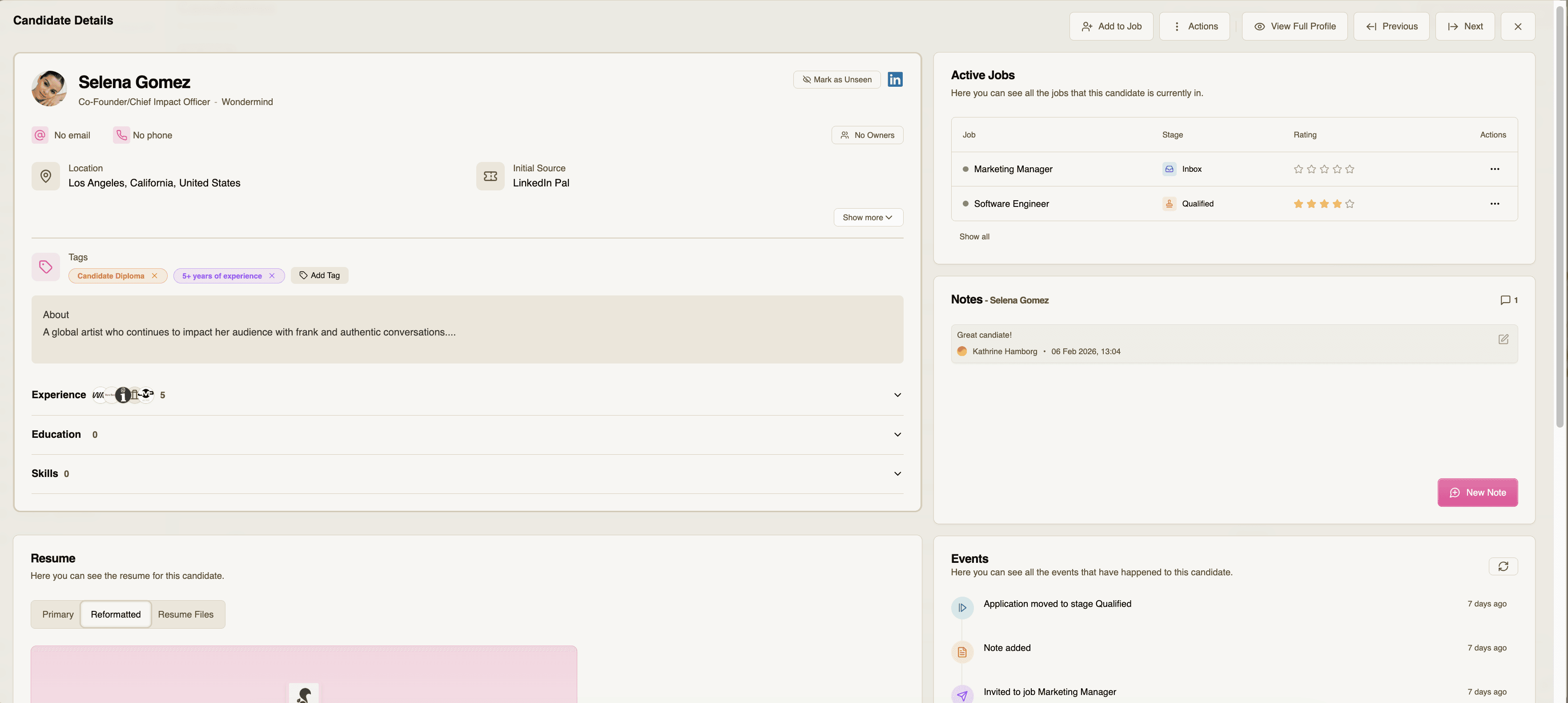
Click on a candidate, you'll see a full snapshot of the candidate profile with:
Phone-number
Email
Tags
Experience
Education
Skills
Resume
Supporting documents
Active Jobs
Notes
Events
Using Tags, Notes, Events, and Supporting Documents
Add Tags to categorize the candidate
Logging calls and meetings in Notes
Get an overview of all Events that have happened to the candidate
Add Supporting Documents like certificates, cover letter, portfolio etc. to have everything stored in one place
Actions in Active Jobs
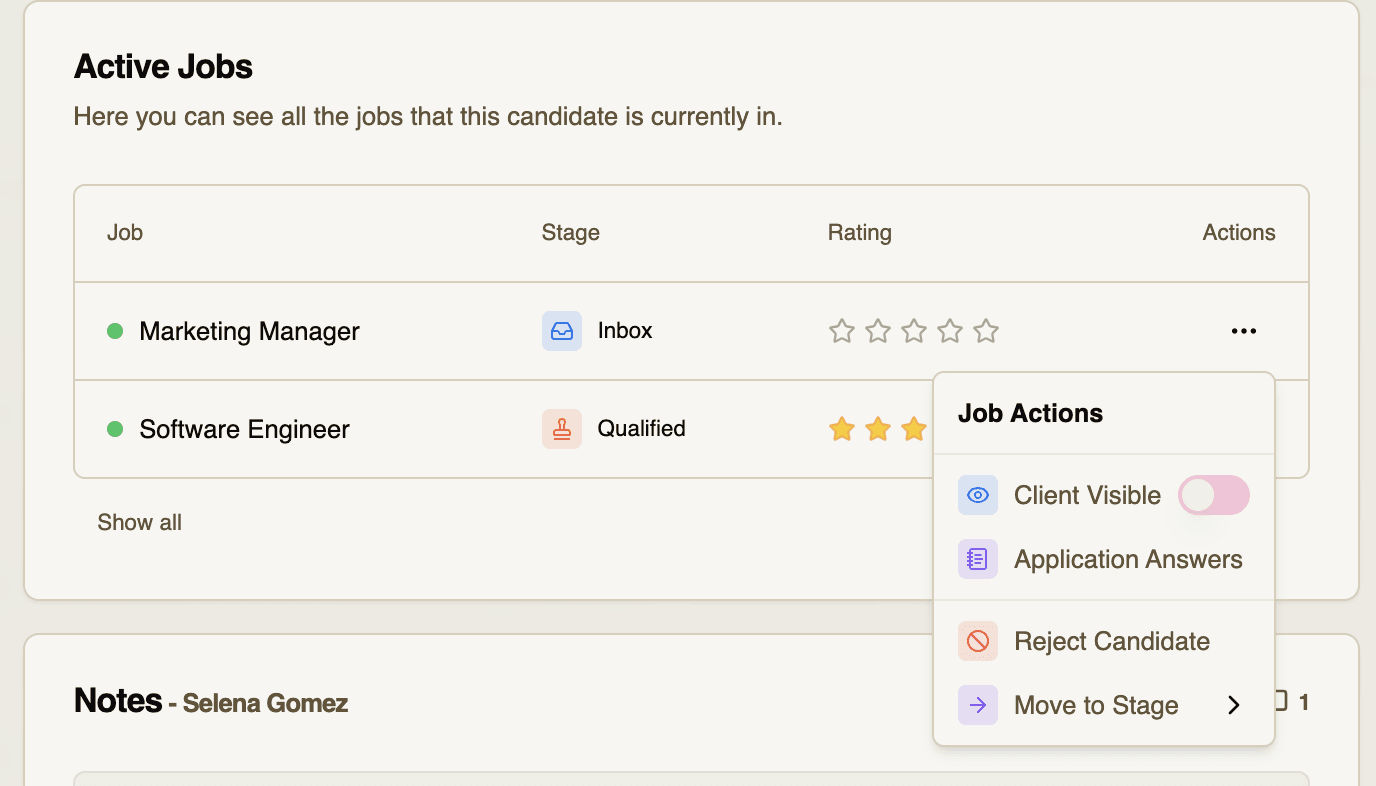
When a candidate has been attached to a job, it will appear in 'active jobs'
By clicking the three dots under 'Actions' you'll be able to:
Make the candidate visible to the client
See Application Answers
Reject the candidate
Move it through stages in your job pipeline
Feeling stuck or unsure how to begin?
Our friendly support team is here to guide you through every step. Just drop us a line: support@happlicant.com