Sourcing
Live
Boolean search
Find exactly who you are looking for with powerful Boolean search built for recruiters who need precision and speed.
Boolean search feature review
What is Boolean search in recruitment?
Boolean search is an advanced search method used by recruiters to filter candidate databases using structured keywords and logical operators.
Instead of relying on basic keyword search, you combine terms using operators like:
AND → must include both terms
OR → include either term
NOT → exclude a term
"Quotes" → search for an exact phrase
Brackets () → group related conditions
This allows you to run precise candidate searches and control exactly which profiles appear in your results.
Boolean operators explained
Boolean search uses simple operators to control how keywords are combined.
AND operator
Requires both terms to appear in the candidate profile
marketing AND automationThis returns candidates who mention both marketing and automation
OR operator
Expands the search by including candidates who match either term
"account manager" OR "sales executive"This returns candidates with either title.
NOT operator
Excludes specific keywords from your results
marketing NOT internshipThis removes candidates who mention internships
Quotation marks
Use "quotes" to search for an exact phrase
"customer success manager"
This prevents unrelated marches like customer support or success specialist
Brackets
Use brackets () to group related terms
developer AND (react OR python OR javascript)This tells the search to match developer plus one of the technologies
Where Boolean Search looks
Boolean search in Happlicant scans the entire candidate profile, not just job titles or profile fields.
Your search query runs across:
• CV and resume content
• Supporting documents attached to candidate profiles
• Recruiter notes
• Tasks and activity history
• Candidate profile fields
• Data imported through the LinkedIn Chrome extension
This means you can surface candidates based on skills, technologies, experience, industries, or keywords mentioned anywhere in their profile.
Example:
A candidate may not list React in their job title, but if it appears in their CV, notes, or LinkedIn data, Boolean search will still find them.
Example Boolean Search
"software engineer" AND (React OR Angular) NOT intern
This will show candidates who:
• Contain the exact phrase "software engineer"
• Mention React or Angular
• Do not contain the word intern
If you work with a large talent pool, Boolean search helps you quickly narrow down results and build more accurate shortlists.
1
Advanced candidate search
Run structured searches across job titles, skills, and keywords inside Happlicant.
2
Faster shortlists
Find relevant candidates in seconds instead of manually reviewing candidate profiles.
3
Full database search
Search across CVs, notes, documents, tasks, and LinkedIn data to uncover hidden candidates already in your database.
Jump on a quick demo call to see how this, and many other features, can save you time and help you grow your agency.

FAQs
What is Boolean search in recruitment?
Boolean search is a structured search method that uses operators like AND, OR, and NOT to refine candidate search results inside an ATS or recruitment CRM.
Does Boolean search work inside CVs and notes?
Yes. Boolean search scans the entire candidate profile, including CV content, documents, recruiter notes, tasks, and LinkedIn data imported via the Chrome extension.
Which Boolean operators can I use?
You can use AND, OR, and NOT, as well as brackets to group search conditions for more advanced queries.
Do I need technical knowledge to use Boolean search?
No. Boolean search is simple to learn. Recruiters only need to understand basic operators like AND, OR, and NOT to start running advanced searches.
Is Boolean search only useful for technical recruitment?
No. It works for any role where precision matters, including sales, marketing, operations, finance, and executive search. Any recruiter managing a growing candidate database benefits from structured search.
Boolean search: How-to guide
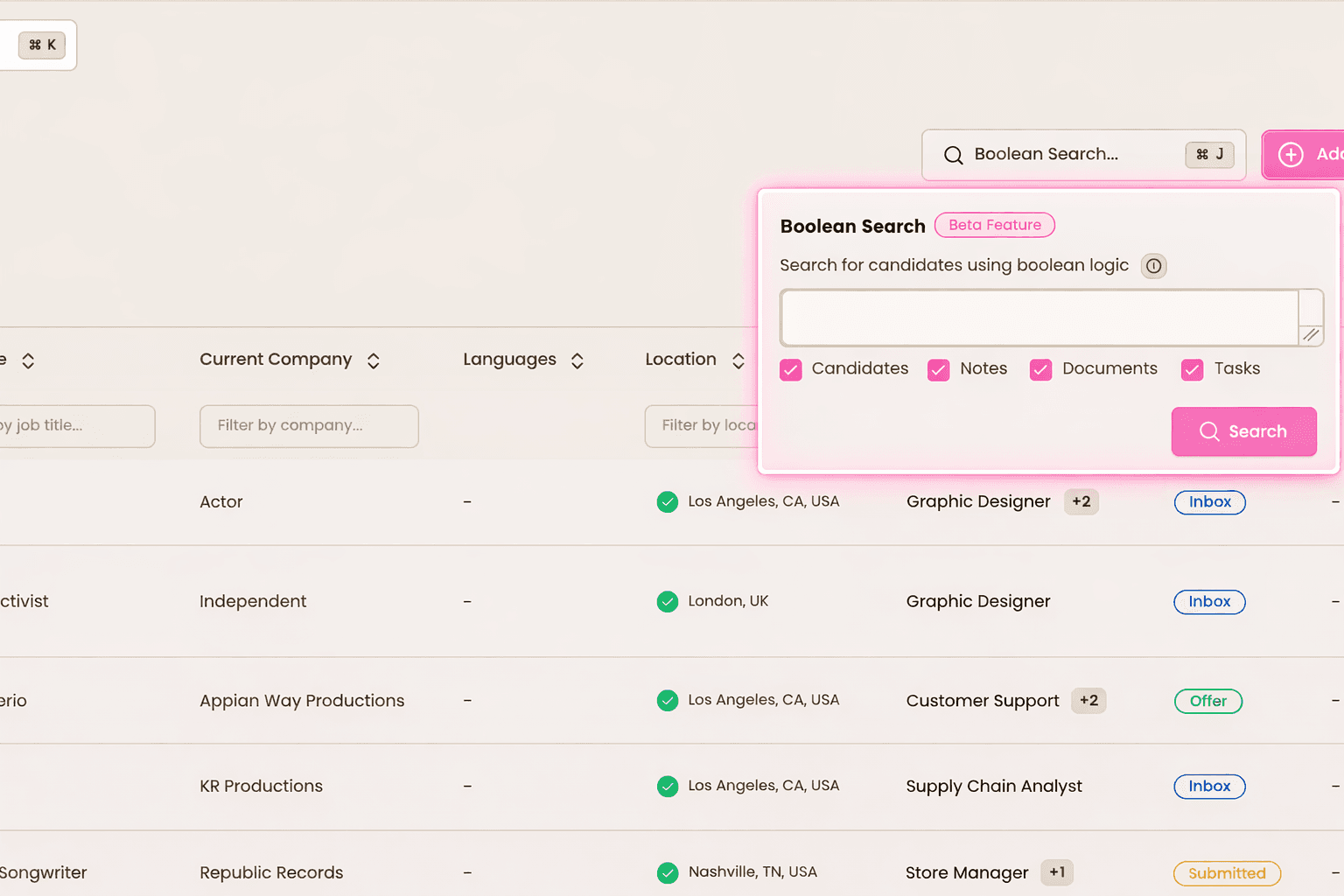
1. Open Boolean search
Go to your Candidates view and click into the Boolean search bar.
A dedicated search window will appear where you can enter your Boolean search string and choose which data sources to include.

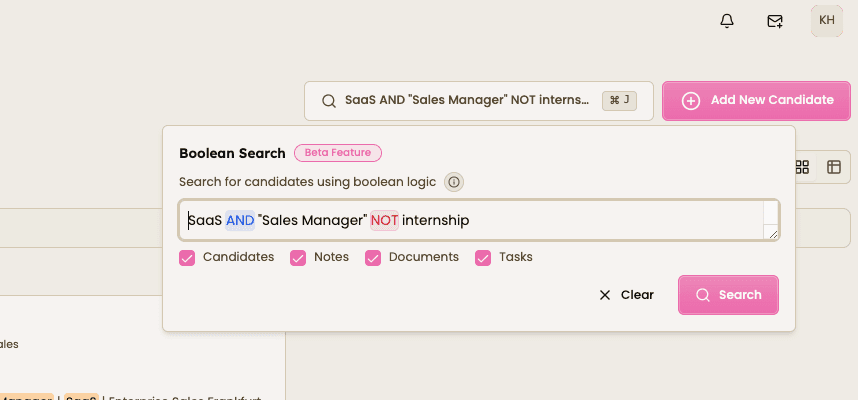
2. Enter your search string
Type your keywords and combine them using Boolean operators.
You can refine searches using quotation marks and brackets.
Example:("account executive" OR "sales manager") AND SaaS NOT internship
This allows you to control exactly which candidates appear in your search results.


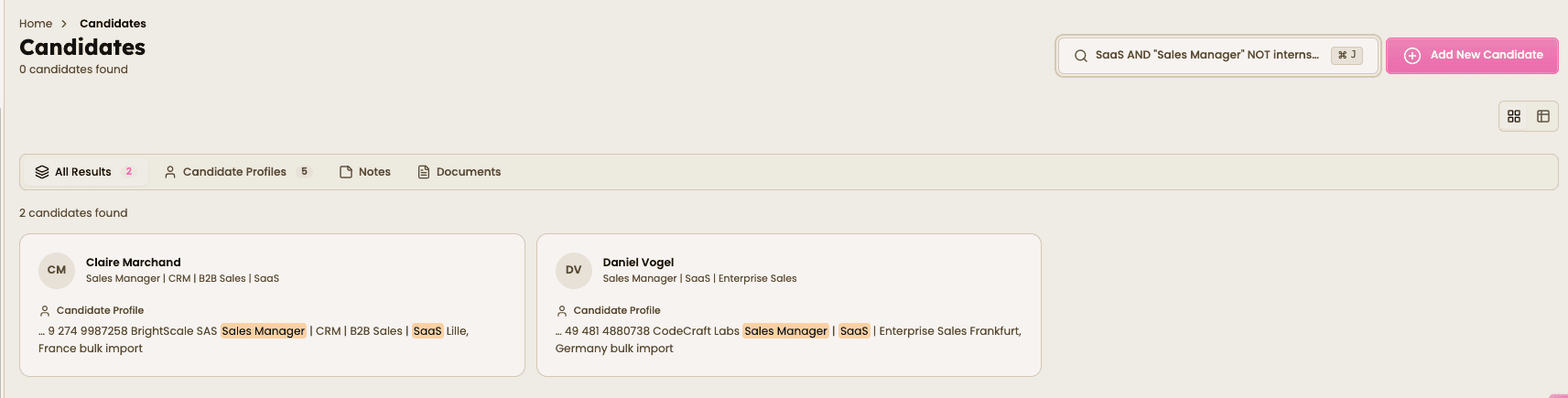
3. Run and refine
Click Search to generate your filtered candidate list instantly.
If your results are too broad:
add more AND conditions.
If they’re too narrow:
use OR terms to expand the search.
You can then move candidates directly into your recruitment pipeline.

Why use Boolean Search in Happlicant?
As your recruitment database grows, simple keyword search becomes less effective.
Boolean search allows recruiters to:
• Reduce time-to-shortlist
• Improve sourcing accuracy
• Eliminate irrelevant profiles
• Rediscover qualified candidates already in the ATS
• Build stronger candidate shortlists
Whether you're recruiting for technical, sales, marketing, operations, or executive roles, structured search helps you find the right candidates faster.

Feeling stuck or unsure how to begin?
Our friendly support team is here to guide you through every step. Just drop us a line: support@happlicant.com