ATS with client portal in 2026: what it actually changes for your agency

ATS comparison

Chris Allen
TL;DR
A client portal gives hiring managers a live, permission-controlled view into their own hiring pipeline, so they can review candidates, leave feedback, and check status without a single status-update email.
Happlicant, Bullhorn, Recruiterflow, Manatal, and Recruit CRM all offer one, but they differ in how much control you get over what clients see and how the portal is branded. Book a call to see Happlicant’s client portal in action.
If you’re searching for an “ATS with client portal” or a “recruitment software with client portal,” you already know the problem you’re solving: too much of your week goes to answering “any update on candidate X?” instead of actually recruiting.
A client portal is a secure, permission-controlled workspace inside your ATS or CRM where a hiring manager can log in, see exactly the candidates and jobs you’ve chosen to share with them, leave feedback or a thumbs up/down, and track where things stand, all without you drafting another status email.
Happlicant, Bullhorn, Recruiterflow, Manatal, and Recruit CRM all include this feature in some form, though the depth of control and the client-facing polish varies a lot between them, which is what this comparison actually covers.
What a client portal changes for an agency’s client relationships
Before you had a portal, every client update meant a recruiter stopping mid-task to compile a spreadsheet or write an email summarizing where a search stood. That adds up to a meaningful chunk of every week, and it’s time that doesn’t move a single candidate closer to placement.
A client portal changes three things in practice:
Fewer status-check emails. Clients can log in and see submission status themselves, which means the “just checking in” emails mostly stop.
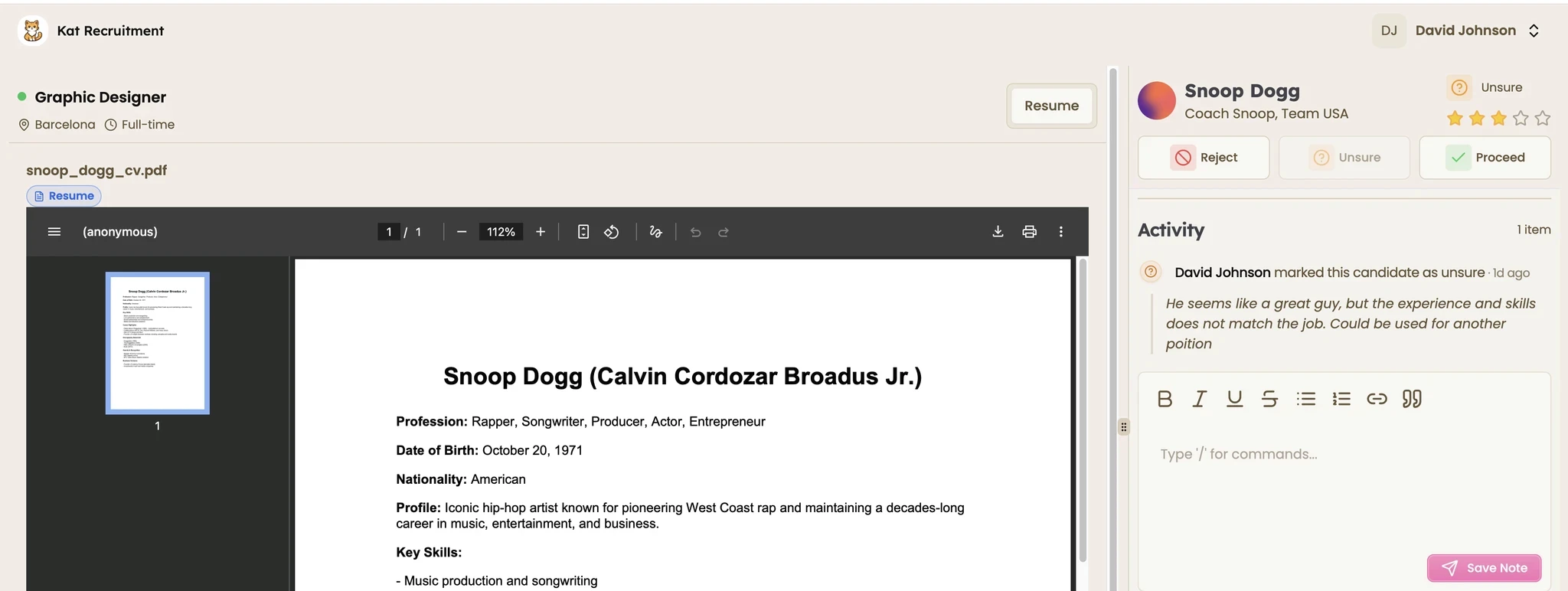
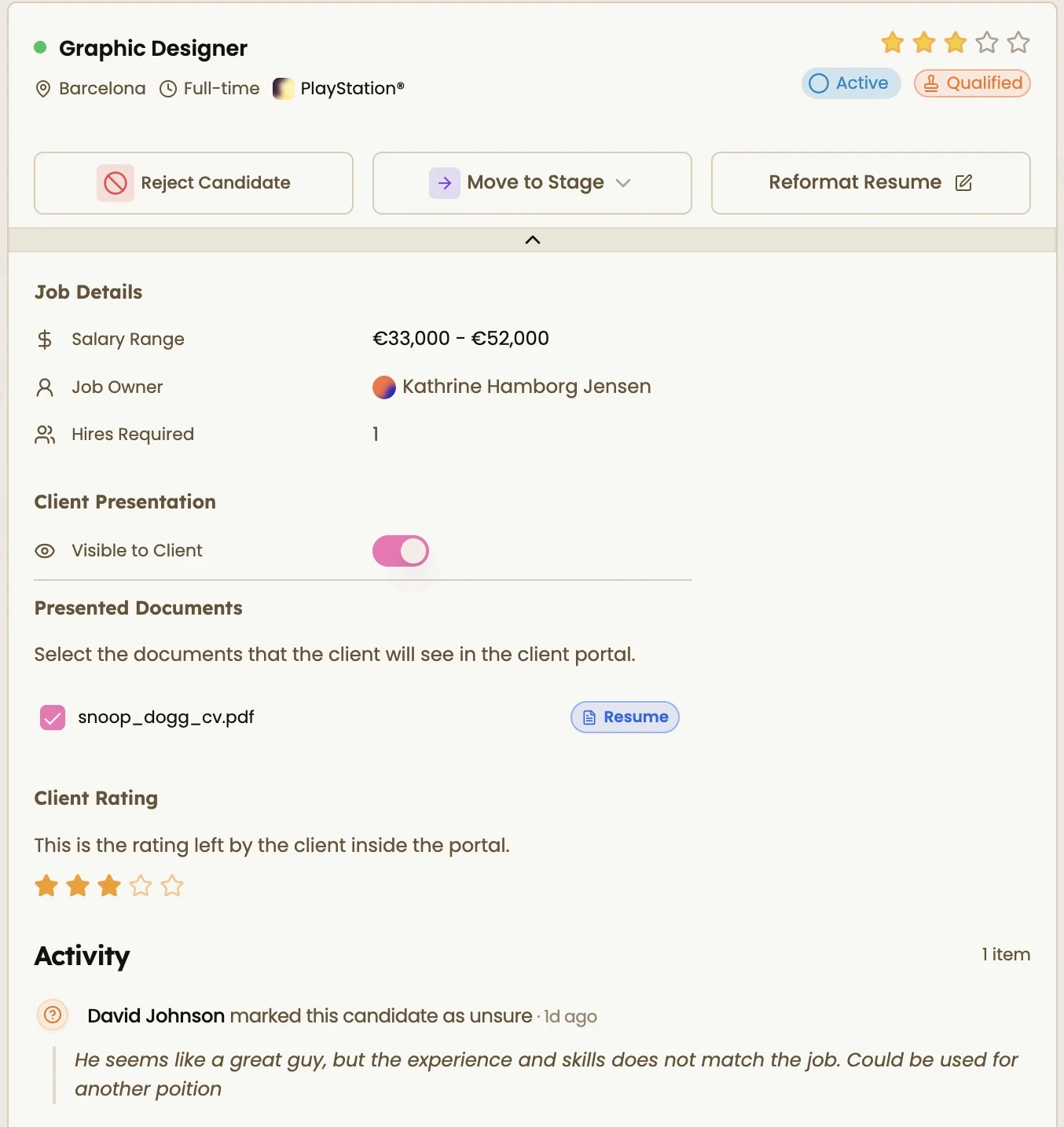
Faster feedback loops. Instead of a client replying to an email three days later, a portal lets them leave feedback or move a candidate forward the moment they’ve reviewed a profile, often with a simple approve or reject action.
Better perceived professionalism. A branded, self-service view into an active search signals that your agency runs a modern process, which matters more than it should when a client is comparing you against two other agencies.
The catch is that not every “client portal” does the same job. Some tools give clients a genuinely useful live view with granular permissions over what’s visible per job. Others bolt on a read-only candidate list that doesn’t let clients act on anything, which defeats a lot of the purpose.
Try Happlicant for free
Get access to the fastest-growing agency & independent recruiter software. CRM, ATS and much more to run and grow your business more efficiently.
Happlicant’s client portal
Happlicant’s client portal gives each client a dedicated, branded login where they see only the jobs and candidates you’ve chosen to share with them. Recruiters control visibility at the candidate level, so a candidate can be pulled back from view while reference checks are still in progress, and clients can leave feedback or move candidates through agreed stages directly in the portal instead of over email.
Because the portal sits inside the same platform as the ATS and CRM, there’s no separate login or third-party tool for either your team or your client to manage.
How the client portal feature compares across platforms
Across every platform here, the portal exists in some form, so the real differentiator is how much friction there is in setting it up and how granular the visibility controls are, not whether the feature exists at all.
Platform | Client Portal Available | What Clients Can Do | Notable Limitations |
|---|---|---|---|
Happlicant | Yes, included on every plan | View shared candidates and jobs, leave feedback, track status | N/A, built in from the base plan |
Bullhorn | Yes, via VMS/portal functionality | View pipeline status, review candidates, track placements | May require higher-tier pricing and additional setup |
Recruiterflow | Yes | View shared candidates, give thumbs up/down feedback, view live dashboards | Some users report the setup and sharing flow is not intuitive |
Manatal | Yes, called the “Guest Portal” | View shared candidate progress, raise job requisitions | Only available on the Recruitment Agency account type, not the Company/Corporate version |
Recruit CRM | Yes | View candidate summaries, submit feedback, track job status | Full feature depth varies by plan tier |

Get access to the fastest-growing agency & independent recruiter software. CRM, ATS and much more to run and grow your business more efficiently.
What to actually check before picking a tool for this
If a client portal is the deciding feature for you, a few questions matter more than the marketing copy on any pricing page:
Can you control visibility candidate by candidate, or is it all-or-nothing per job
Is the portal branded with your agency’s identity, or does it look like a generic third-party tool
Does the client take an action in the portal (feedback, approval) that actually updates your pipeline, or is it just a read-only view
Is the portal included at your plan level, or does it require an upgrade to a higher tier
Happlicant includes the client portal, along with the rest of the ATS and CRM feature set, on every plan starting at $69/user/month on the quarterly plan, with no separate tier required to unlock it.
The bottom line on ATS and CRM client portals
A client portal earns its keep the moment it replaces even one weekly status email per active client, and every platform compared here offers some version of it. The differences that actually matter are in setup friction, visibility control, and whether it’s included in your base plan or gated behind an upgrade.
If you want to see how Happlicant’s client portal would work for your specific client roster, book a call to start your free trial.

See Happlicant's software in action
Jump on a quick demo call to see how Happlicant's ATS/CRM can save you time and help you grow your agency.