Screening
Live
Toggle standard questions
Customize job application forms with flexible field toggles built for recruiters and staffing agencies. Control which candidate details are required for each role and create a faster, more relevant application experience that improves completion rates.
Toggle standard questions feature review
The toggle standard questions feature gives recruiters complete control over job application forms directly inside your recruitment CRM software. Easily enable or disable application fields like resumes, cover letters, phone numbers, LinkedIn profiles, and location details based on the requirements of each role.
Recruitment agencies and independent recruiters can quickly adjust application settings for different industries, seniority levels, and hiring workflows without relying on developers or manual form edits. Whether you need a simplified application form for high-volume hiring or detailed candidate information for executive recruitment, every field can be customized in seconds.
Targeted application forms help reduce candidate drop-off and improve application completion rates by only asking for relevant information. Candidates are more likely to complete applications when the process feels straightforward and role-specific.
You can also create default application field settings for future job postings, helping your recruitment team maintain consistency across every vacancy while saving time on manual setup. This keeps your hiring workflow organized, scalable, and easier to manage as your agency grows.
1
Improve candidate experience
Keep application forms simple and relevant by only requesting essential information. Shorter, targeted applications help increase candidate completion rates.
2
Flexible application settings
Turn standard application fields on or off for each job opening. Adapt your recruitment process quickly for different roles, industries, and hiring requirements.
3
Capture better recruitment data
Customize forms to collect the candidate information that matters most to your hiring process. Better data leads to stronger candidate evaluations and faster placements.
Jump on a quick demo call to see how this, and many other features, can save you time and help you grow your agency.

FAQs
How do customizable application forms improve recruitment?
Customizable application forms help recruiters collect role-specific candidate information while reducing application drop-off rates. Simpler forms often lead to higher completion rates and better candidate experiences.
Can recruiters make application fields mandatory or optional?
Yes. Recruiters can set fields like resumes, phone numbers, LinkedIn profiles, and cover letters as mandatory or optional directly inside the recruitment CRM.
Why should recruitment agencies customize job application forms?
Customized application forms help agencies streamline candidate screening, improve data collection, and create more efficient hiring workflows for different job types.
Can default application settings be applied to every job posting?
Yes. Recruiters can create default application field settings that automatically apply to future job listings, saving time and ensuring consistency across recruitment campaigns.
Which application fields can recruiters customize?
Recruiters can customize fields including resumes, cover letters, phone numbers, locations, LinkedIn profiles, and other standard candidate application details based on hiring needs.
Toggle standard questions: How-to guide
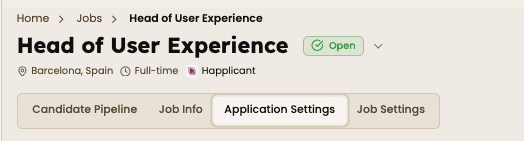
1. Open the Job Position
Navigate to the specific job listing where you want to customize the application form and click the "Application Settings" tab inside the job page to manage candidate application fields for that specific position.

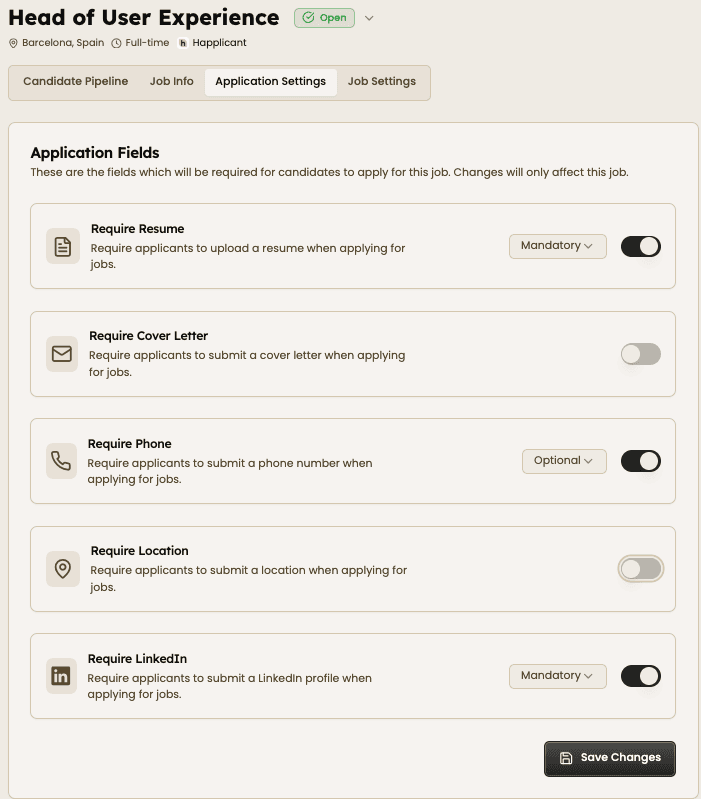
2. Toggle Application Fields and Adjust Mandatory or Optional
Enable or disable fields like resume uploads, cover letters, phone numbers, locations, and LinkedIn profiles depending on what you need for the role. Choose which fields are required during the application process.

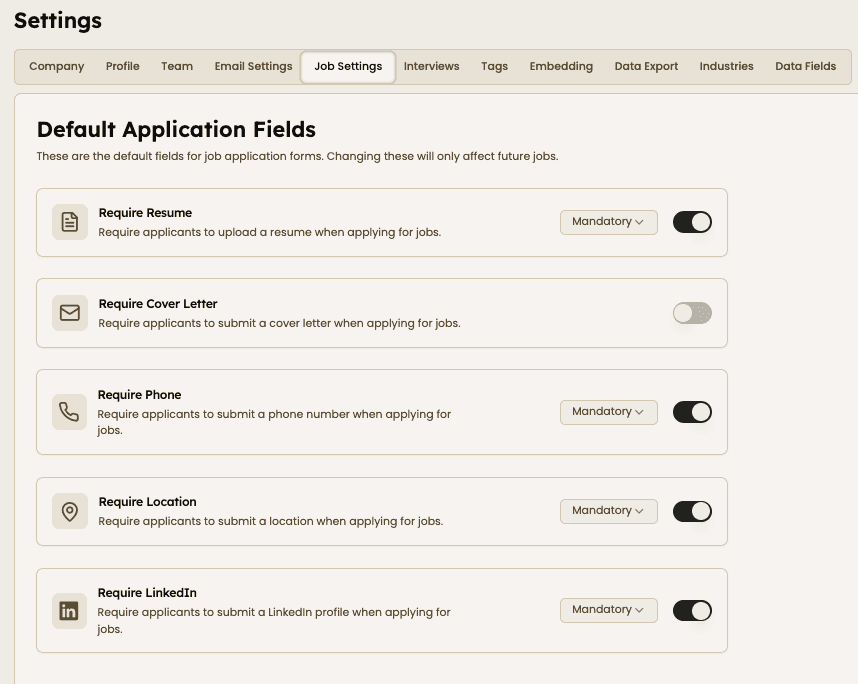
3. Create Default Application Settings
Go to the main Job Settings page to configure default application fields for all future job postings. This saves time and keeps your recruitment workflow consistent across every vacancy.


Feeling stuck or unsure how to begin?
Our friendly support team is here to guide you through every step. Just drop us a line: support@happlicant.com