Jobs
Live
Rich text editing
Write polished job descriptions and recruiter notes with rich text editing software built for recruiters and staffing agencies. Create structured, easy-to-read content that improves hiring workflows and delivers a more professional candidate experience.
Rich text editing feature review
Rich text editing gives recruiters the flexibility to create cleaner, more organized job descriptions and internal notes without relying on external editors or complicated formatting tools.
Use headings, bullet points, numbered lists, bold text, hyperlinks, and structured sections to create job postings that are easier for candidates to read and understand. Clear formatting helps highlight responsibilities, requirements, salary details, and company information while improving the overall quality of your recruitment content.
The editor also supports recruiter collaboration by making candidate notes and hiring updates more structured and readable. Hiring teams can document interview feedback, client updates, scheduling details, and candidate evaluations in a consistent format directly inside the recruitment CRM.
For independent recruiters and small staffing agencies, this reduces time spent fixing formatting issues across documents and keeps communication centralized in one workflow. Instead of switching between external tools, recruiters can manage job content, candidate notes, and internal collaboration directly inside the ATS and recruitment platform.
Well-structured content also improves candidate engagement. Professional and easy-to-read job descriptions help applicants understand the role faster, increasing the chances of attracting qualified candidates who align with the position.
Whether creating job ads or documenting hiring conversations, rich text editing helps recruiters communicate more clearly, stay organized, and maintain a more professional recruitment process.
1
Create better job descriptions
Use headings, bullet points, links, and styled text to create structured job postings that are easier for candidates to read and apply to.
2
Speed ud recruitment workflows
Format job descriptions and recruiter notes quickly without external tools. Keep communication clear while reducing manual editing and repetitive formatting tasks.
3
Improve team collaboration
Create organized recruiter notes and candidate updates that help teams share hiring information more efficiently across the recruitment process.
Jump on a quick demo call to see how this, and many other features, can save you time and help you grow your agency.

FAQs
What is rich text editing in recruitment software?
Rich text editing allows recruiters to format job descriptions and recruiter notes using headings, bullet points, bold text, hyperlinks, and structured layouts directly inside the recruitment platform.
How does rich text editing improve job postings?
Structured formatting makes job descriptions easier to read, helping candidates quickly understand responsibilities, requirements, and company information while improving application quality.
Can recruiters create formatted candidate notes inside the CRM?
Yes. Recruiters can create organized interview notes, hiring feedback, and client updates directly inside the recruitment CRM using rich text formatting tools.
Why is formatted recruitment content important?
Clear and professional formatting improves communication between recruiters, candidates, and clients while helping recruitment teams stay more organized throughout the hiring process.
Does rich text editing help small recruitment agencies?
Yes. Rich text editing reduces manual formatting work, centralizes recruitment communication, and helps small agencies create more professional job postings and hiring documentation faster.
Rich text editing: How-to guide
Write and Format Content Easily
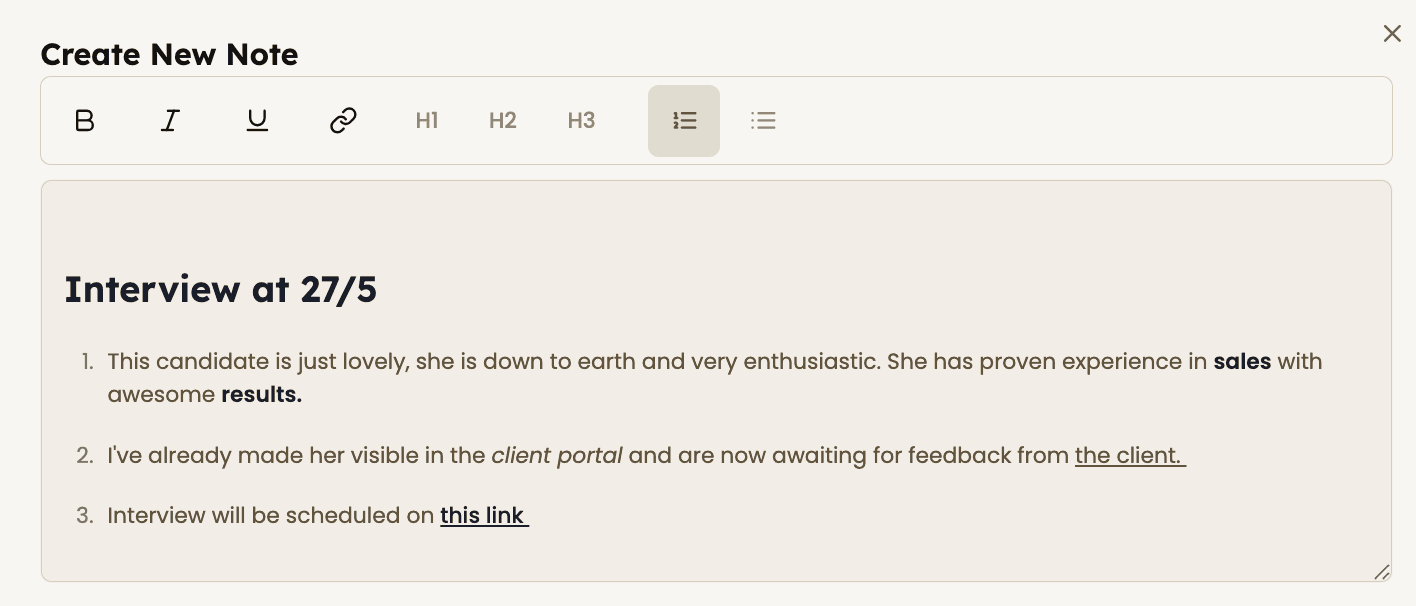
Use the rich text editor to create clean, professional job descriptions and recruiter notes directly inside your recruitment CRM.
Add headings, bullet points, links, and styled text to organize information clearly and improve readability for candidates, clients, and hiring teams.
Format interview feedback, candidate updates, and job requirements in a structured way so important information is easier to review and share across your recruitment workflow.




Feeling stuck or unsure how to begin?
Our friendly support team is here to guide you through every step. Just drop us a line: support@happlicant.com