Candidates

Live

Custom tags

Turn your ATS into a precision tool. With custom tags in Happlicant, organizing your recruitment database becomes effortless -unlocking better targeting, smarter outreach, and a clearer view of every relationship.

Custom tags feature review

Level up your day-to-day with custom tags built specifically for independent recruiters and small agencies. Happlicant’s flexible tagging system transforms your ATS into a precision engine - making candidate prospecting more intuitive, organized, and effective.

With personalized, searchable tags like “Top Tech Talent,” “Ghosted Me,” or “Hired via Referral,” you can categorize candidates in ways that actually reflect how you work. Whether you're tracking candidate details, engagement levels, or niche skills, tags empower you to stay one step ahead.

Assign tags manually, automatically, or in bulk. Use them to:

  • Group candidates by experience, industry, or communication history

  • Track interest, salary, or feeling

  • Build filtered shortlists and trigger outreach or reminders based on tag activity

This modern approach to candidate relationship management simplifies your search process, enhances placement success, and helps you focus on connecting the right people to the right opportunities.

Custom tags key benefits

1

Enhanced organization

No more one-size-fits-all fields. Tags adapt to how you work - create tags like “Open to Relocation”, “Needs Follow-Up”, Location, Skills, Languages and apply them in seconds.

2

Faster candidate matching

Improve your recruitment agency’s efficiency by streamlining the search process. Custom tags help you quickly identify candidates that fit specific job requirements.

3

Automation & Efficiency

Trigger sequences, follow-ups, or reminders based on tags. Auto-tag from applications or LinkedIn Chrome extension imports.

Custom tags: See it in action

Custom tags: See it in action

Jump on a quick demo call to see how this, and many other features, can save you time and help you grow your agency.

FAQs

What are tags used for?

Tags help you categorize and organize candidates in your database. You can use them to highlight skills, traits, experience levels, or any custom categories that matter to your hiring process.


Can I edit or delete tags after creating them?

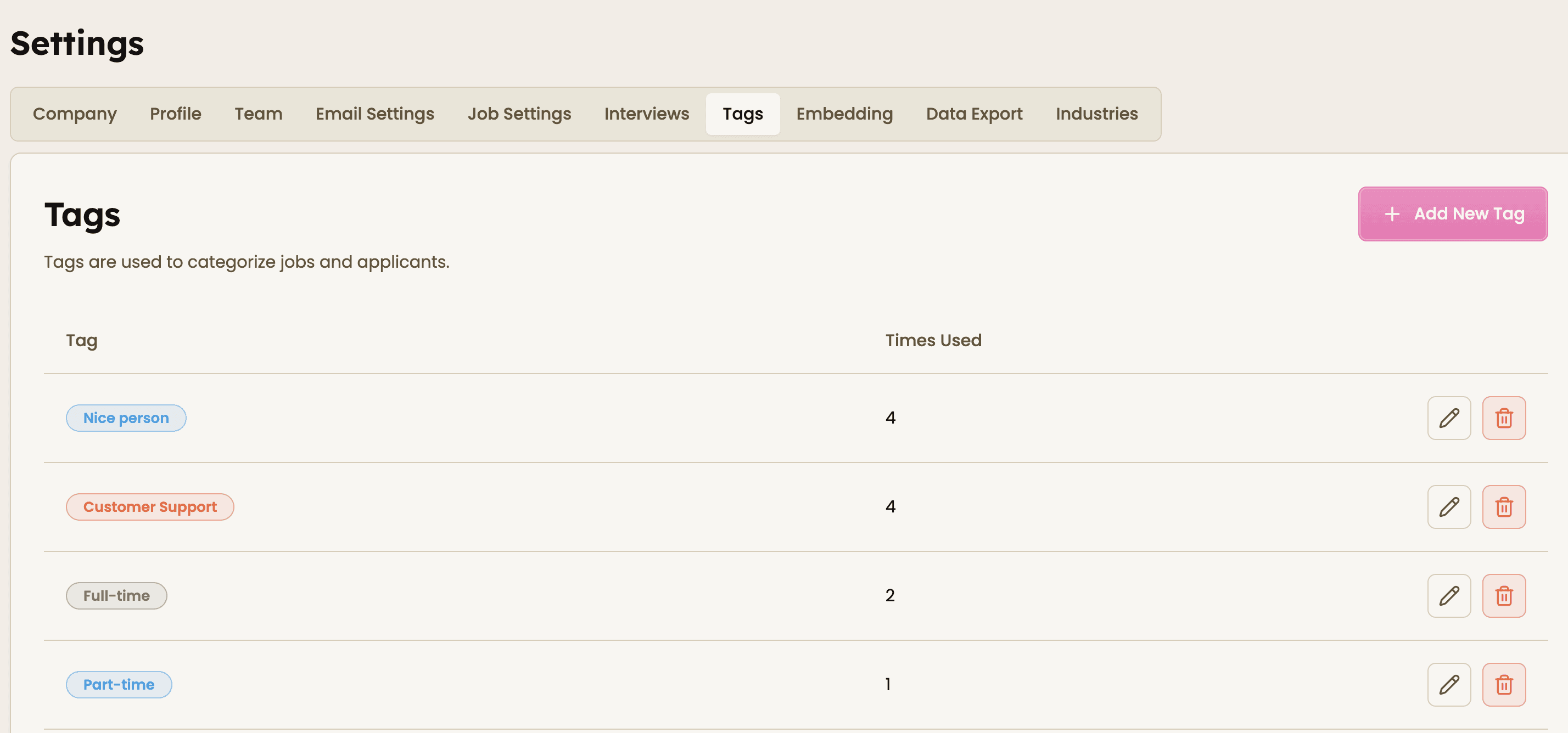
Yes. You can manage your tags anytime in Settings → Tags, where you can rename or remove tags as your hiring workflow evolves. You can also always remove tags from a candidate by clicking the small 'x' on the side

Can multiple tags be added to the same candidate?

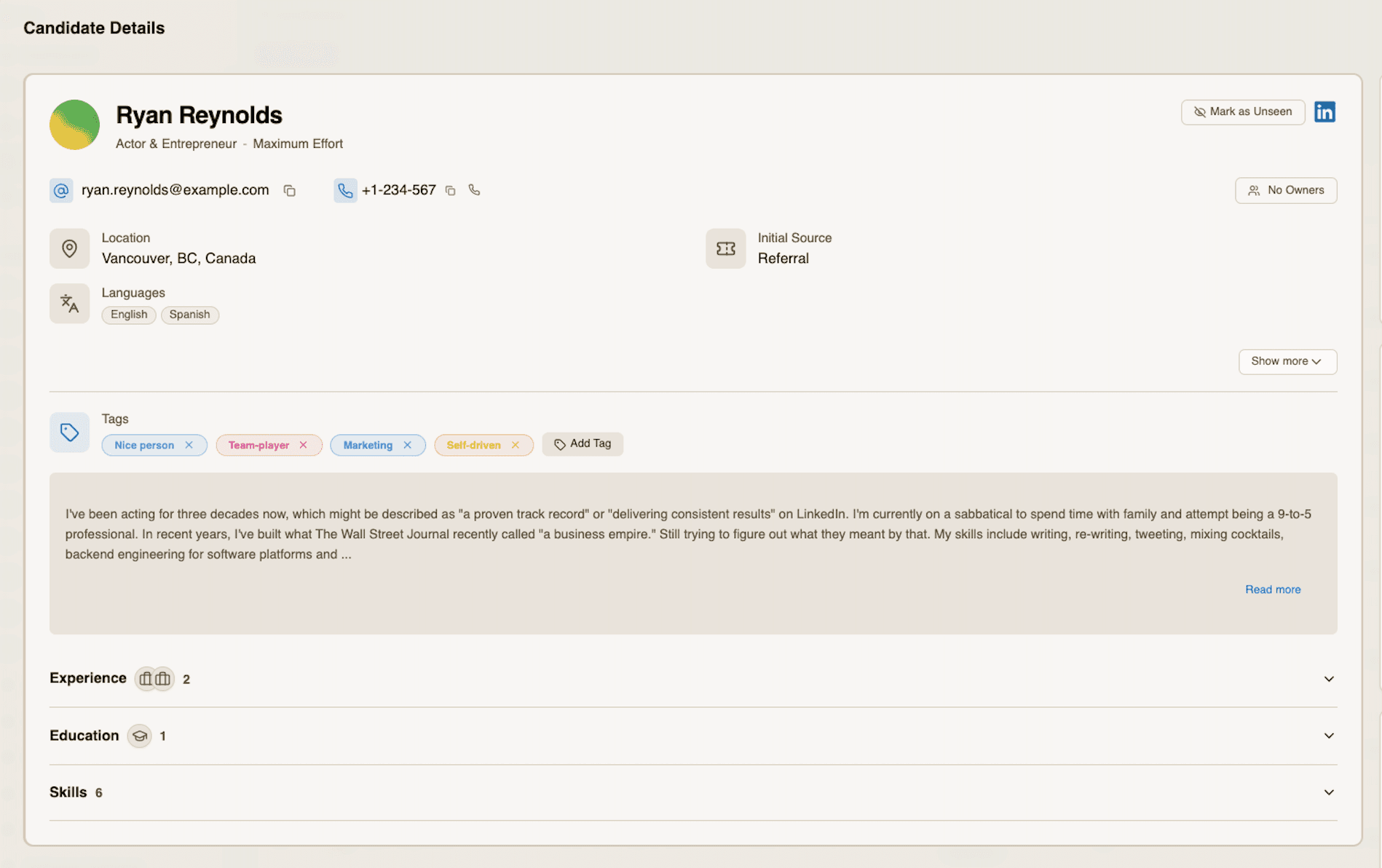
Yes. You can assign multiple tags to a single candidate, allowing you to categorize them in different ways (for example skills, experience level, or hiring priority).

How do I create new tags?

You can create tags in two ways:

  • Go to Settings → Tags and add new tags there, or

  • Click “Add tag” directly in the candidate profile when assigning tags.

Custom tags: How-to guide

  1. Create tags

You can create tags in two ways:

  • Go to Settings → Tags and add the tags you want to use, or

  • Click “Add tag” directly from the Tags section in a candidate profile.

  1. Assign tags to candidates

Open a candidate profile and select the relevant tags to categorize them based on skills, experience, status, or any other criteria. If you use the Chrome extension, you can also assign tags directly while sourcing and adding new candidates.
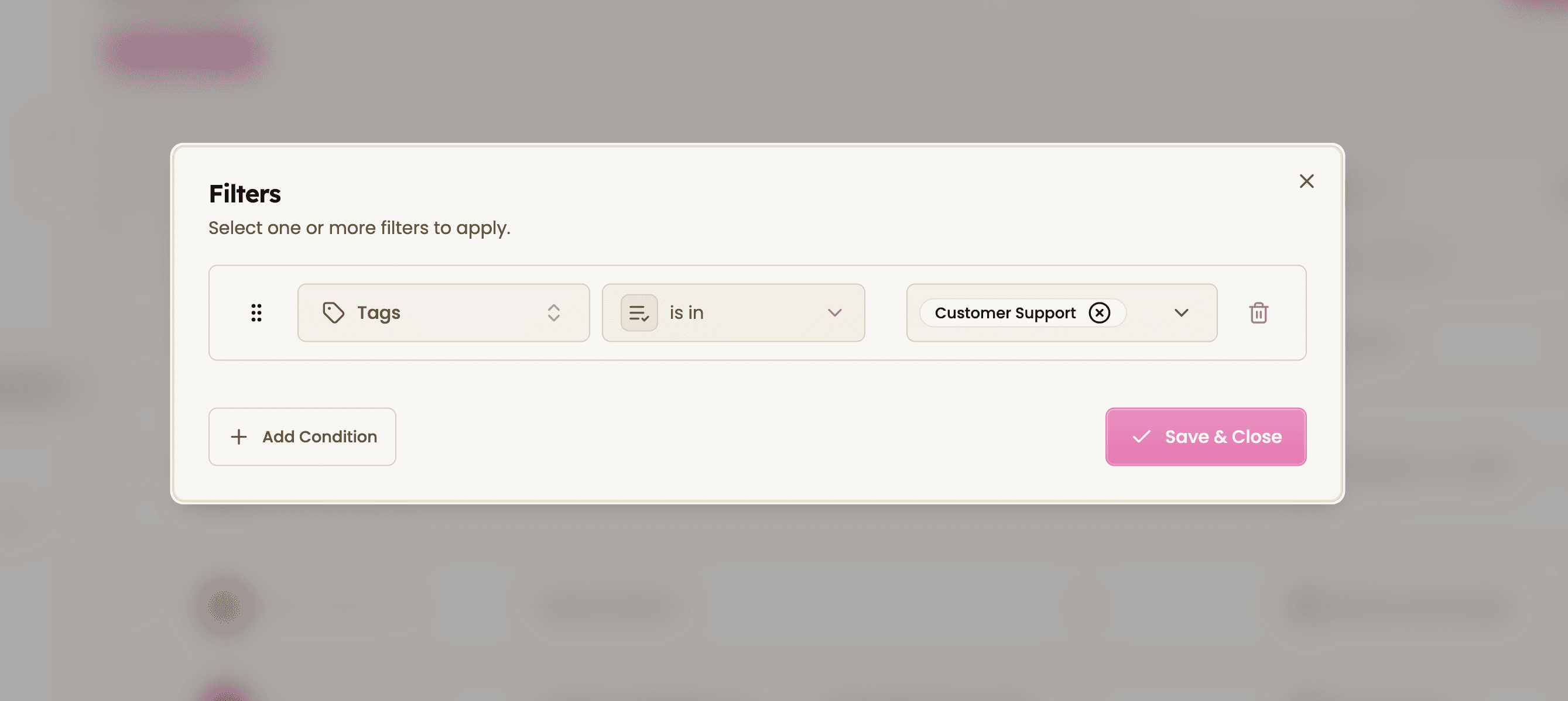
  1. Filter candidates by tags

Use tags to quickly filter and search your candidate database, making it easier to find the right profiles.
Feeling stuck or unsure how to begin?

Our friendly support team is here to guide you through every step. Just drop us a line: support@happlicant.com


-What is Happlicant?

Built to unleash your agency's superpowers

Happlicant is a modern ATS + CRM designed for recruitment agencies and independent recruiters. It helps users manage candidates, clients, jobs, sourcing, communication, and automations in one place.

1

Sales CRM

Close deals faster with smart pipelines, automations, email tracking, and Chrome extension for instant lead capture.

2

Recruiting CRM

Engage candidates effortlessly with templates, notes, smart automations, and LinkedIn Chrome tools to source candidates instantly.

3

Applicant Tracking

Find, track, and place top talent with AI parsing, Boolean search, automated pipelines, and jobs auto-synced to your site.

-What is Happlicant?

Built to unleash your agency's superpowers

Happlicant is a modern ATS + CRM designed for recruitment agencies and independent recruiters. It helps users manage candidates, clients, jobs, sourcing, communication, and automations in one place.

1

Sales CRM

Close deals faster with smart pipelines, automations, email tracking, and Chrome extension for instant lead capture.

2

Recruiting CRM

Engage candidates effortlessly with templates, notes, smart automations, and LinkedIn Chrome tools to source candidates instantly.

3

Applicant Tracking

Find, track, and place top talent with AI parsing, Boolean search, automated pipelines, and jobs auto-synced to your site.

-What is Happlicant?

Built to unleash your agency's superpowers

Happlicant is a modern ATS + CRM designed for recruitment agencies and independent recruiters. It helps users manage candidates, clients, jobs, sourcing, communication, and automations in one place.

1

Sales CRM

Close deals faster with smart pipelines, automations, email tracking, and Chrome extension for instant lead capture.

2

Recruiting CRM

Engage candidates effortlessly with templates, notes, smart automations, and LinkedIn Chrome tools to source candidates instantly.

3

Applicant Tracking

Find, track, and place top talent with AI parsing, Boolean search, automated pipelines, and jobs auto-synced to your site.

-What is Happlicant?

Built to unleash your agency's superpowers

Happlicant is a modern ATS + CRM designed for recruitment agencies and independent recruiters. It helps users manage candidates, clients, jobs, sourcing, communication, and automations in one place.

1

Sales CRM

Close deals faster with smart pipelines, automations, email tracking, and Chrome extension for instant lead capture.

2

Recruiting CRM

Engage candidates effortlessly with templates, notes, smart automations, and LinkedIn Chrome tools to source candidates instantly.

3

Applicant Tracking

Find, track, and place top talent with AI parsing, Boolean search, automated pipelines, and jobs auto-synced to your site.

Stop adapting to software.
Get a system that adapts to
your exact requirements

Stop adapting to software.
Get a system that adapts to
your exact requirements

Stop adapting to software.
Get a system that adapts to
your exact requirements

Stop adapting to software.
Get a system that adapts to
your exact requirements

Overall percentile: 96th

No strings attached

No contracts, no yearly lock-ins, no hassle. Our priority is simple: to make you exceptionally happy.

Book a call with us today!

Overall percentile: 96th

No strings attached

No contracts, no yearly lock-ins, no hassle. Our priority is simple: to make you exceptionally happy.

Book a call with us today!

Overall percentile: 96th

No strings attached

No contracts, no yearly lock-ins, no hassle. Our priority is simple: to make you exceptionally happy.

Book a call with us today!

Overall percentile: 96th

No strings attached

No contracts, no yearly lock-ins, no hassle. Our priority is simple: to make you exceptionally happy.

Book a call with us today!